

Quick Answer:
Managing one clinical study requires careful planning, consistent communication, and attention to detail. When several studies are running at the same time, keeping track of participant visits, follow-up appointments, pending assessments, and study deadlines becomes even more challenging. For a clinical research coordinator, even a small scheduling oversight can create additional work for the research team. A reliable system helps manage these responsibilities while maintaining accurate records and clear communication across the study team
Key Takeaways
- A centralized clinical trial calendar makes it easier to review appointments across multiple studies.
- Organizing visits by study and participant helps prevent scheduling confusion.
- Automated reminders can support timely appointment preparation and follow-up activities.
- Tracking protocol-defined visit windows helps coordinators plan appointments appropriately.
- Dedicated follow-up trackers make outstanding responsibilities easier to identify.
- Daily and weekly scheduling reviews help teams identify potential conflicts early.
Why Do Visit Dates and Follow-Ups Become Difficult to Manage Across Multiple Studies?
When research teams manage several active studies, each trial brings its own schedule, requirements, and participant commitments. One study may require frequent visits during the first few weeks, while another may involve longer intervals between appointments and extended follow-up periods.
Keeping all these timelines in mind can quickly become difficult, particularly when scheduling information is spread across spreadsheets, emails, paper calendars, and separate study documents.
Some common challenges include:
- Overlapping participant visits: Different participants may have appointments scheduled on the same day, creating scheduling conflicts for coordinators and site staff.
- Different protocol requirements: Each study follows its own visit schedule, assessment windows, and follow-up procedures.
- Last-minute changes: Participants may cancel, request rescheduling, or become unavailable, requiring coordinators to update several records.
- Multiple communication channels: Appointment confirmations, reminders, and follow-up requests may arrive through different platforms.
- Limited visibility: When information is stored in separate files, it can be difficult to identify upcoming appointments and outstanding tasks across studies.
For a clinical trial coordinator, these challenges can make daily planning less predictable. Instead of working from a clear schedule, coordinators may spend considerable time checking records, searching through emails, and confirming appointment details.
The solution starts with creating a consistent system that makes important dates, responsibilities, and pending activities easy to identify.
7 Practical Ways to Prevent Missed Visits and Follow-Ups
Managing several studies does not necessarily require a more complicated workflow. In many cases, improving how scheduling information is organized and reviewed can make a meaningful difference.
Here are seven practical approaches research teams can implement.
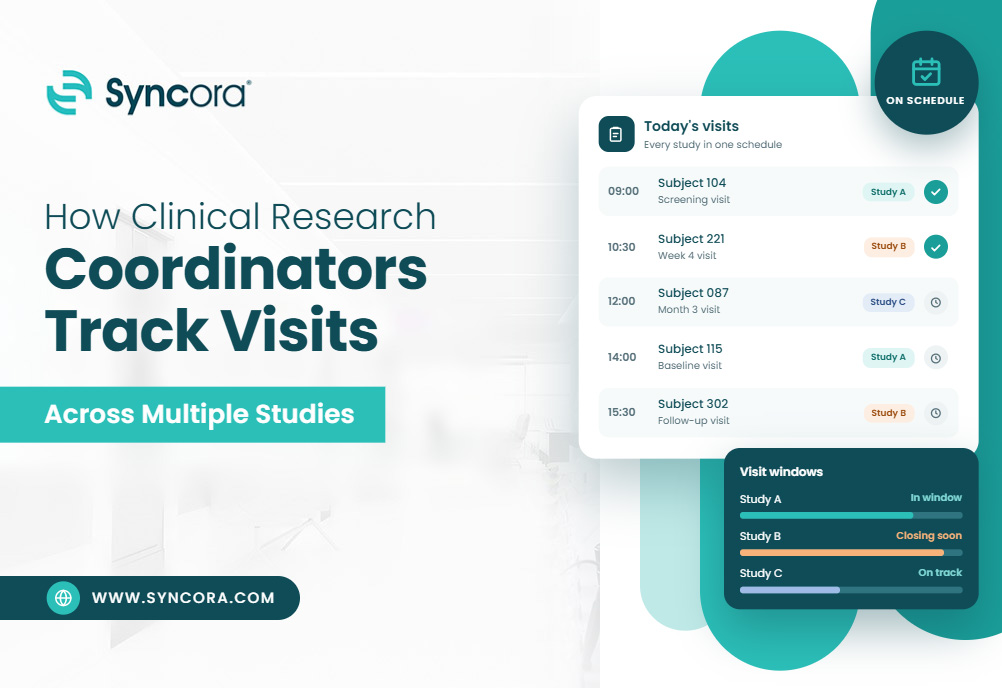
1. Create a Centralized Clinical Trial Calendar
One of the most effective ways to manage multiple studies is to maintain a centralized clinical trial calendar.
Rather than relying on separate personal calendars or individual spreadsheets, coordinators can use a shared scheduling system that provides visibility into upcoming study activities.
A centralized calendar should include:
- Study identification or protocol number.
- Participant identification code.
- Scheduled visit date.
- Required visit or assessment type.
- Permitted visit window, where applicable.
- Assigned coordinator or responsible team member.
- Follow-up date and status.
For example, a coordinator managing three studies should be able to review upcoming appointments across all three without opening multiple documents.
However, combining schedules does not mean combining protocol requirements. Each study should retain its own approved visit schedule and applicable procedures.
The calendar should serve as an organizational overview, while the protocol and approved study documents remain the source of truth for visit requirements.
2. Organize Visits by Study and Participant
A shared calendar is useful, but it needs a consistent organization system.
A clinical study coordinator can divide scheduling information into separate study categories while maintaining an overall view of upcoming activities.
For instance, the scheduling system could use:
- Study A: Screening and baseline visits.
- Study B: Treatment and monitoring visits.
- Study C: Long-term follow-up appointments.
Within each study, participant appointments should be identifiable through appropriate study-specific codes rather than unnecessary personal information.
This approach makes it easier to distinguish between appointments, especially when several participants have visits scheduled on the same day.
It also helps coordinators identify workload distribution and potential scheduling conflicts before they become difficult to manage.
3. Set Reminders for Upcoming Visits and Follow-Ups
Remembering every appointment manually is not a sustainable scheduling strategy when multiple trials are active.
Instead, establish a reminder process that provides enough time to prepare for upcoming activities.
A practical reminder structure may include:
- One week before: Review the upcoming visit requirements and confirm scheduling details.
- Two to three days before: Send an appointment reminder through an approved communication channel.
- One day before: Complete a final scheduling check, where appropriate.
- After the visit: Record the visit status and identify any outstanding follow-up activities.
The exact reminder intervals should depend on the study protocol, site procedures, and participant communication requirements.
A clinical trial coordinator can also use task reminders for activities that do not involve participant appointments, such as pending documentation, outstanding data queries, and scheduled assessments.
Automated reminders can reduce dependence on memory, but they should support rather than replace coordinator oversight.
4. Track Visit Windows Instead of Only Appointment Dates
A common scheduling mistake is treating every visit date as a fixed appointment without considering the protocol-defined visit window.
Some clinical trials allow visits to occur within specified windows around a target date. Others have more restrictive scheduling requirements.
For this reason, coordinators should track both the target visit date and the applicable visit window.
A useful scheduling record may include:
| Scheduling detail | Information to track |
|---|---|
| Target date | Protocol-defined planned visit date |
| Earliest date | Beginning of the permitted window |
| Latest date | End of the permitted window |
| Confirmed date | Actual scheduled appointment |
| Visit status | Upcoming, completed, rescheduled, or pending |
This provides a clearer picture of which appointments require immediate attention.
For example, if two participants have visits scheduled during the same week, the coordinator can review their respective visit windows before arranging appointments.
The key is to follow the specific protocol requirements rather than assuming that all studies use the same scheduling flexibility.
5. Maintain a Follow-Up Tracking System
Not every important study activity happens during a scheduled participant visit. Coordinators also need to track follow-up calls, pending assessments, missing documentation, and other outstanding responsibilities.
A dedicated follow-up tracker helps ensure these activities do not disappear among daily scheduling tasks.
A useful tracker should include:
- Study and participant identification.
- Description of the required follow-up.
- Date the activity became due.
- Assigned team member.
- Expected completion date.
- Current status.
- Notes on outstanding actions.
For example, if a participant’s visit has been completed but a required follow-up activity remains pending, the tracker should make that outstanding task visible.
A clinical research coordinator should review this tracker regularly and update each item when its status changes.
It is also important to distinguish between completed visits and completed study-related activities. Recording an appointment as completed does not automatically mean every associated task has been finalized.
6. Establish a Daily and Weekly Scheduling Review
Even with a centralized system, schedules need regular attention.
A short daily review helps coordinators identify immediate priorities, while a weekly review provides a broader view of upcoming study activities.
Daily review: At the beginning of each working day, check:
- Participant visits scheduled for the day.
- Appointments requiring confirmation.
- Follow-ups due within the next 24 hours.
- Rescheduled or cancelled appointments.
- Pending tasks requiring team attention.
Weekly review: Once a week, review:
- Visits scheduled over the next 7–14 days.
- Upcoming protocol-defined visit windows.
- Participants who need appointment confirmation.
- Overlapping staff responsibilities.
- Outstanding follow-up activities.
- Tasks approaching their internal deadlines.
A clinical project coordinator may also use weekly reviews to identify scheduling pressure across different research teams or study locations.
The purpose is to identify potential problems early, rather than waiting until a missed appointment or overdue task requires attention.
7. Use Clear Handoffs When Responsibilities Are Shared
In busy research environments, multiple team members may contribute to participant scheduling and follow-up activities.
One coordinator may schedule an appointment, another may handle participant communication, and a third may update the relevant study records.
Without clear handoffs, tasks can be duplicated or overlooked. To prevent this, every outstanding activity should have an assigned owner.
Research teams can establish simple handoff practices, such as:
- Assigning one responsible person to each follow-up task.
- Recording the latest scheduling updates in the designated system.
- Documenting rescheduled appointments.
- Communicating unresolved scheduling issues during team meetings.
- Confirming task ownership before transferring responsibilities.
A clear handoff process gives everyone a better understanding of what has been completed and what still requires attention.
How Clinical Trial Management Software Helps Coordinate Multiple Studies?
Manual calendars and spreadsheets can be useful when managing a small number of study activities. However, as the number of active studies and participants increases, maintaining several disconnected tracking systems can become difficult.
This is where clinical trial management software can support research operations.
A Clinical Trial Management System (CTMS) provides a centralized platform for organizing and monitoring different aspects of clinical trial operations. Depending on the system and its configuration, it may support participant scheduling, site management, task tracking, and study progress monitoring.
Here are some ways it can help.
Centralized Scheduling and Study Visibility
A CTMS can bring scheduling information from different studies into one organized environment.
Instead of switching between multiple spreadsheets, coordinators may be able to review upcoming activities through centralized dashboards and scheduling views.
This can make it easier to identify upcoming appointments, review study timelines, and organize daily responsibilities.
Automated Task and Visit Reminders
Some CTMS software solutions offer configurable reminders and task notifications.
These features can help coordinators identify upcoming appointments, outstanding tasks, and activities approaching their due dates.
Depending on the system, reminders may be configured for specific study activities or assigned team members.
However, automated notifications should always be reviewed within the context of the approved protocol and site procedures.
Improved Task Ownership and Progress Tracking
When several people contribute to a study, knowing who is responsible for each activity is important.
Clinical trial software may provide task assignment and status-tracking features that allow teams to monitor pending and completed activities.
This helps reduce uncertainty around task ownership and makes it easier to identify items that require attention.
Better Organization of Study Information
A centralized system can also help teams maintain consistent study records and improve access to relevant operational information.
The ICH E6(R3) Good Clinical Practice guideline emphasizes the importance of maintaining essential records that are identifiable, appropriately controlled, complete, and readily accessible.
A suitable digital system can support record organization and retrieval when configured according to applicable requirements and the organization’s procedures.
Importantly, using a CTMS does not automatically establish regulatory compliance. System selection, validation where applicable, access controls, training, and documented processes remain important considerations.
For research teams evaluating technology options, exploring clinical trial management software solutions can be a useful starting point.
What Should a Research Team Look for in CTMS Software?
Not every research team has the same operational requirements. A system that works for a small site may not provide enough functionality for an organization managing multiple studies across several locations.
Before selecting CTMS software, consider the following capabilities:
| Feature | Why It Matters |
|---|---|
| Centralized study calendar | Provides visibility into upcoming study activities |
| Visit scheduling | Helps organize participant appointments |
| Reminder functionality | Supports timely review of upcoming tasks |
| Task assignment | Clarifies responsibilities across team members |
| Study-level organization | Keeps different protocol requirements separate |
| Reporting dashboards | Helps review outstanding and completed activities |
| Access controls | Supports appropriate access to study information |
| Audit trails | Helps maintain traceability of applicable system activities |
The right clinical trial software should fit the research team’s actual workflow rather than introduce unnecessary complexity.
It is also worth considering whether the platform can accommodate future growth, integrate with existing systems where appropriate, and support the organization’s documentation and oversight processes.
For additional insight, research teams can also explore the role of CTMS in clinical trial operations.
Common Scheduling Mistakes Clinical Research Teams Should Avoid
Even well-organized research teams can experience scheduling problems when processes are inconsistent.
Some common mistakes include:
- Relying entirely on memory: Important dates should be recorded in an approved tracking system rather than remembered individually.
- Using multiple uncoordinated calendars: Separate schedules without a clear central overview can make conflicts harder to identify.
- Ignoring protocol-specific visit windows: Scheduling decisions should always reflect the applicable study requirements.
- Failing to update rescheduled appointments: Changes should be reflected promptly in the appropriate scheduling and study records.
- Leaving follow-up tasks unassigned: Every outstanding activity should have a clear owner.
- Treating automated reminders as confirmation: Notifications do not establish that an appointment has been confirmed or an activity completed.
- Overlooking documentation: Scheduling changes and completed activities should be recorded according to study procedures.
Avoiding these mistakes requires more than a calendar. It requires consistent processes, clear communication, and regular review.
Final Thoughts
Managing several clinical studies at once requires a structured approach to scheduling, participant communication, and task tracking. For a clinical research coordinator, keeping visit dates and follow-ups organized becomes easier when every activity has a defined timeline, an assigned owner, and a reliable tracking process.
A centralized clinical trial calendar, regular scheduling reviews, clear handoffs, and dedicated follow-up trackers can help research teams maintain better visibility into their daily responsibilities.
As study operations become more complex, clinical trial management software and other digital tools can provide additional support through centralized scheduling, task management, and reporting features. The goal is not simply to remember every appointment. It is to establish a repeatable system that helps research teams stay organized, respond to schedule changes, and keep study activities on track.
Frequently Asked Questions
How can a clinical research coordinator manage multiple studies at once?
A coordinator can manage multiple studies by using a centralized scheduling system, organizing appointments by protocol, maintaining separate follow-up trackers, and reviewing upcoming activities regularly. Digital tools such as CTMS platforms can also help centralize operational information.
What should a clinical trial calendar include?
A clinical trial calendar should include study identification, participant identification codes, scheduled visit dates, visit types, applicable visit windows, assigned team members, and appointment statuses. It should also provide visibility into upcoming follow-up activities.
How can research coordinators prevent missed participant visits?
Coordinators can reduce the risk of missed visits by scheduling appointments in advance, setting appropriate reminders, confirming appointments through approved communication channels, and reviewing upcoming visits regularly. Any scheduling changes should also be documented according to study procedures.


